Free WordPress plugin · No paid upgrade

Know who changed what, and when.

AdminTrace is a WordPress activity log written in short sentences instead of raw database dumps. Activate it and recording starts at once — logins, content, plugins, WooCommerce, files, and optional reCAPTCHA v3.

WordPress 6.2+PHP 7.4+Version 1.0.7
wp-admin · AdminTrace
Recording
09:14:02Security

Bot login blocked by reCAPTCHA for username “admin”.

09:14:08Security

Failed login — username does not exist.

09:16:41Plugins

WooCommerce updated 9.4.2 → 9.4.3.

09:21:13Content

Home edited — title, content (added 12 / removed 3 words).

09:33:55Users

Role changed for editor@site — editor → administrator.

1.0.7

Current Version

Free, no paid upgrade

6.2+

WordPress Required

Tested up to 7.1.4

90 days

Default Retention

From 0 days to 10 years

5.0

WordPress.org Rating

Listed in the plugin directory

Audit trail coverage

A clear journal for the whole WordPress site

Search, filters, a timeline, a table, CSV and JSON export, email digests, and retention settings are included. There is no paid upgrade.

Security and user activity

Logins, logouts, and failed logins that say whether the password was wrong or the username does not exist. Optional Google reCAPTCHA v3, Two Factor sign-in, password resets, role changes, and application passwords — without storing secrets.

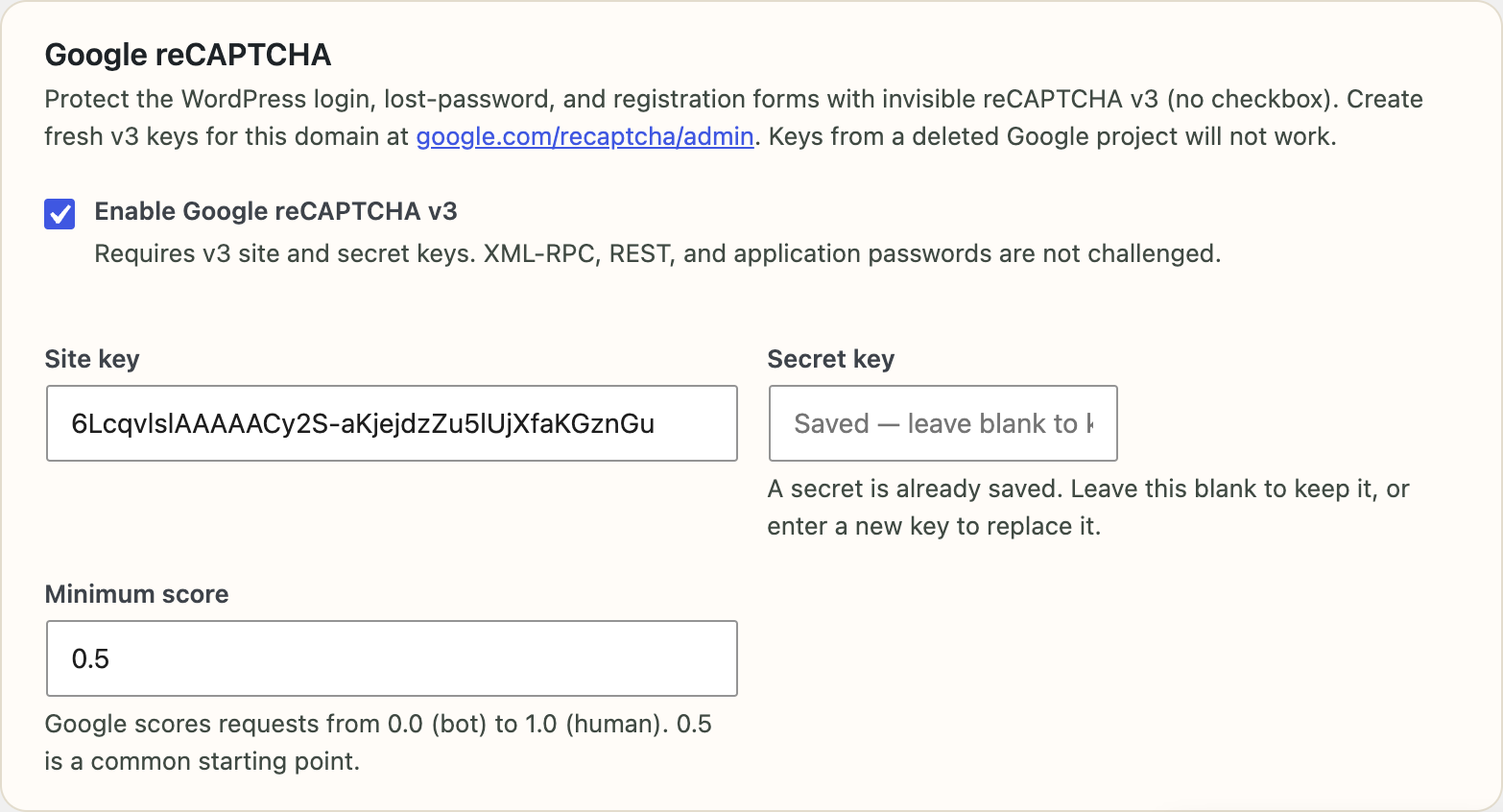
  • ✓Optional invisible reCAPTCHA v3 on login, lost-password, and registration
  • ✓Blocked bot attempts written to the journal
  • ✓Multisite: sites created, deleted, or archived, and users added or removed

Content, media, and comments

Posts, pages, custom post types, and site-editor templates. An edit stores the field names and a short added-and-removed preview, not the full post. Media, menus, widgets, and WordPress 6.9 collaboration notes are included.

  • ✓Media uploads, deletions, and image edits such as crop, rotate, and scale
  • ✓Categories, tags, comments, navigation menus, and sidebar widgets
  • ✓A history panel on the post editing screen for that post

Plugins, themes, WordPress, and settings

Install, update, activation, deletion, and automatic-update toggles, with the plugin or theme name and version. WordPress core updates, language packs, and a curated set of settings are recorded. Password-like options are skipped.

  • ✓Plugin and theme install, update, switch, deletion, and auto-updates
  • ✓Site title, permalinks, homepage, comment rules, and privacy policy page
  • ✓Yoast SEO and Rank Math on-page title, description, and social fields

WooCommerce activity log

When WooCommerce is active, the same journal records order status, coupon codes used on an order, refunds, stock, product price and SKU changes, and store settings such as currency. Customer email addresses are not stored.

  • ✓Order status, refunds, and coupon codes on the order
  • ✓Stock, price, and SKU changes
  • ✓Shop managers can see WooCommerce events without security details

WordPress email log

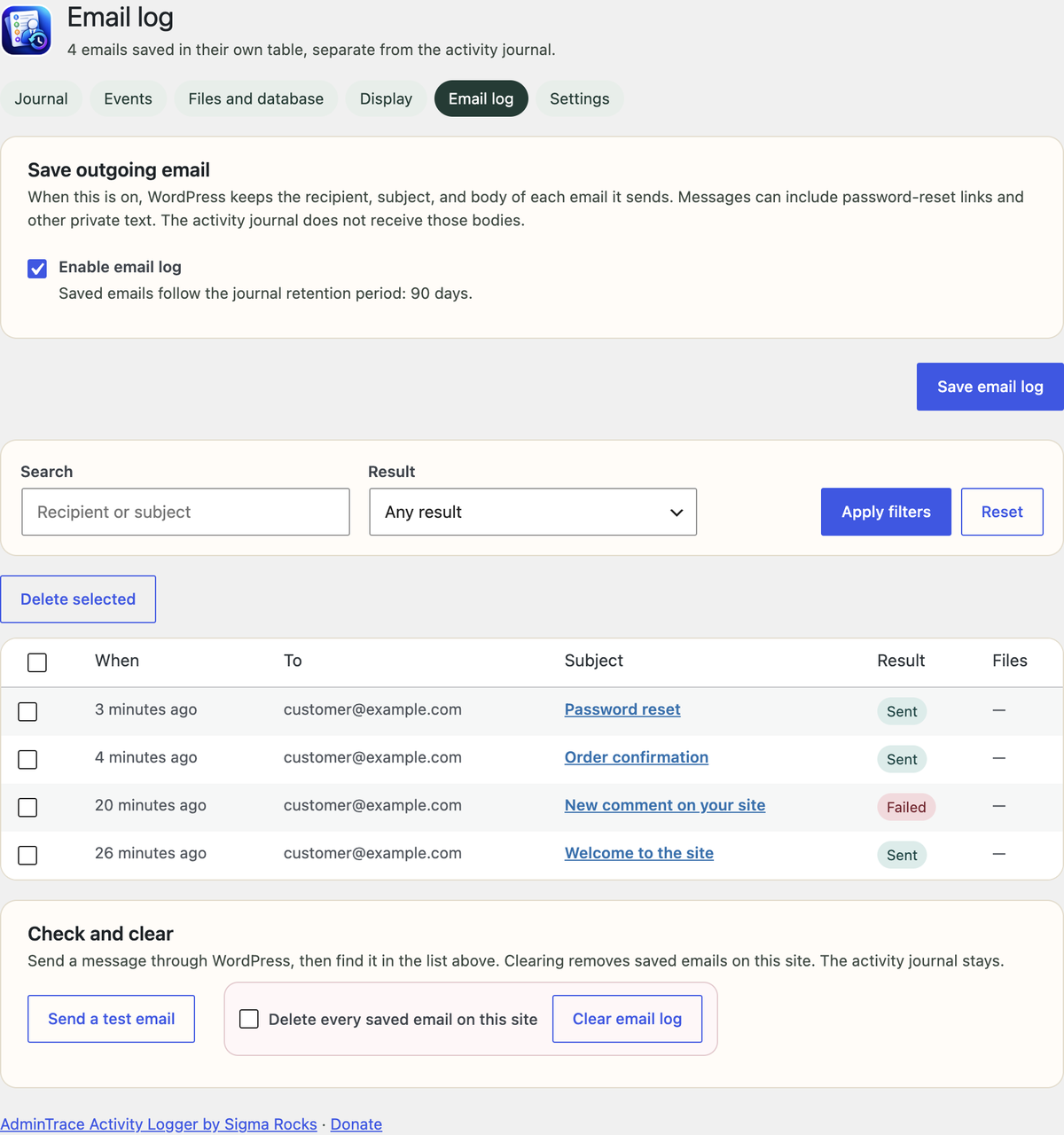
Outgoing mail stays off until an administrator turns it on. Messages sent through wp_mail are saved on a separate Email log screen — recipient, subject, result, headers, and body — with preview and resend. Message bodies stay out of the activity journal.

  • ✓Search by recipient or subject, filter by sent, failed, or unconfirmed
  • ✓Preview rich email or HTML source, then resend to the same recipient
  • ✓Off by default because messages can include password-reset links

Files, database, and exports

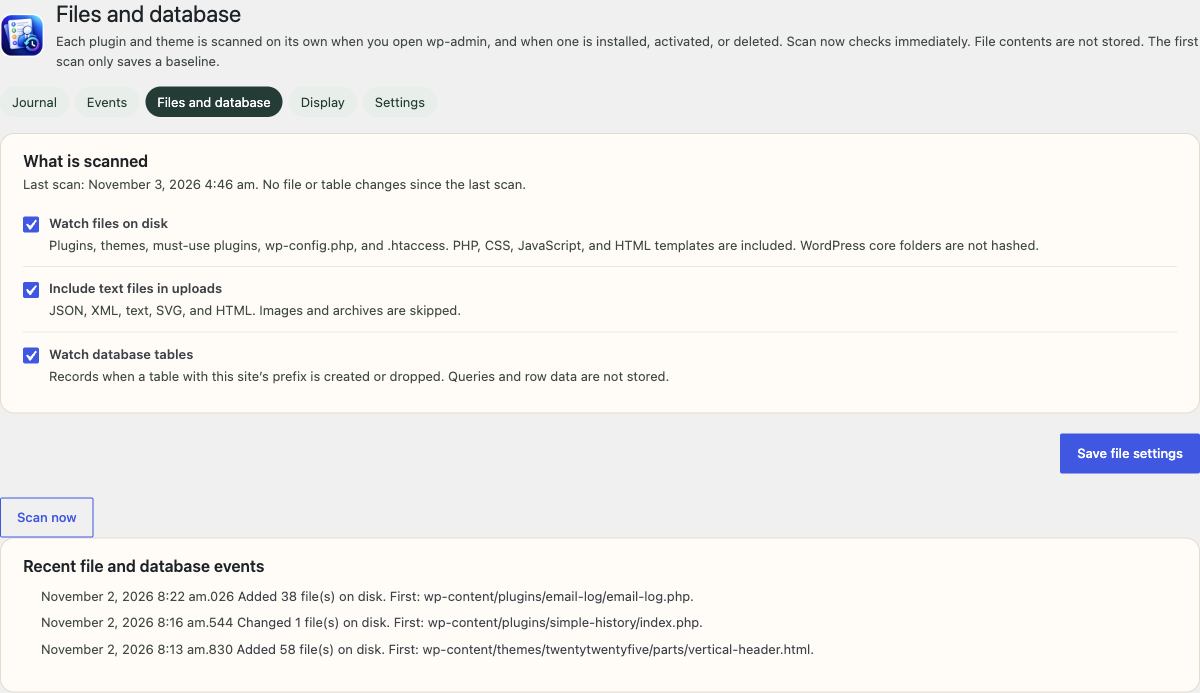
A scan records PHP, JavaScript, CSS, and HTML files that were added, changed, or deleted in plugins, themes, and must-use plugins, plus wp-config.php and .htaccess. Export the current journal filters as CSV or JSON, up to 5,000 rows.

  • ✓Timeline and table views, dashboard widget, and admin-bar list
  • ✓Daily or weekly email digest and failed-login threshold alerts
  • ✓REST API, WP-CLI, and srah_log() for other plugins to add events

Inside the plugin

Journal, settings, email log, and reCAPTCHA

Timeline and table views, per-event switches, a file scan, and an optional email log that stays off until you turn it on.

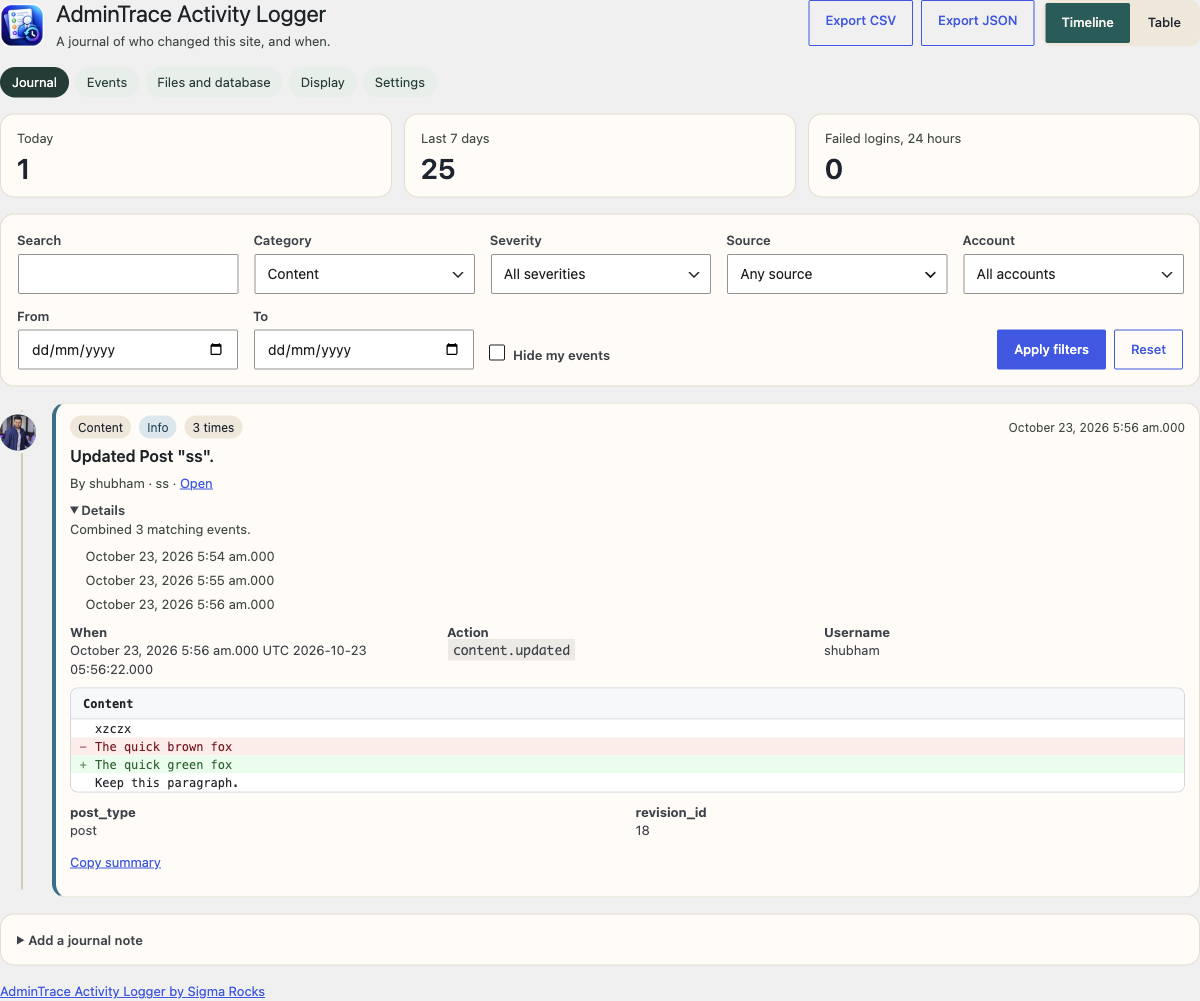
AdminTrace activity journal with search, filters, and a post edit shown as added and removed lines
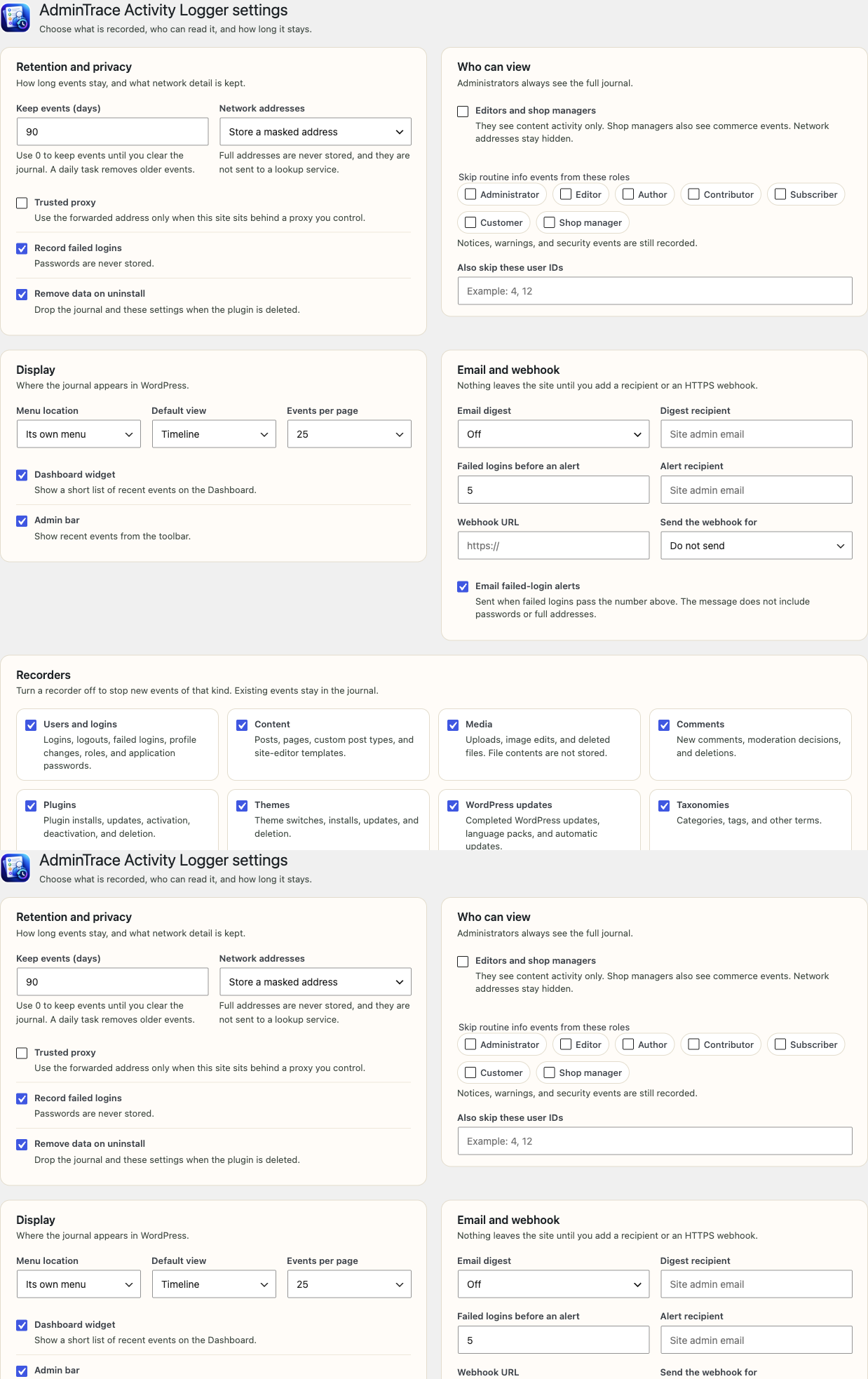
AdminTrace settings for retention, who can read events, and optional email or webhook alerts
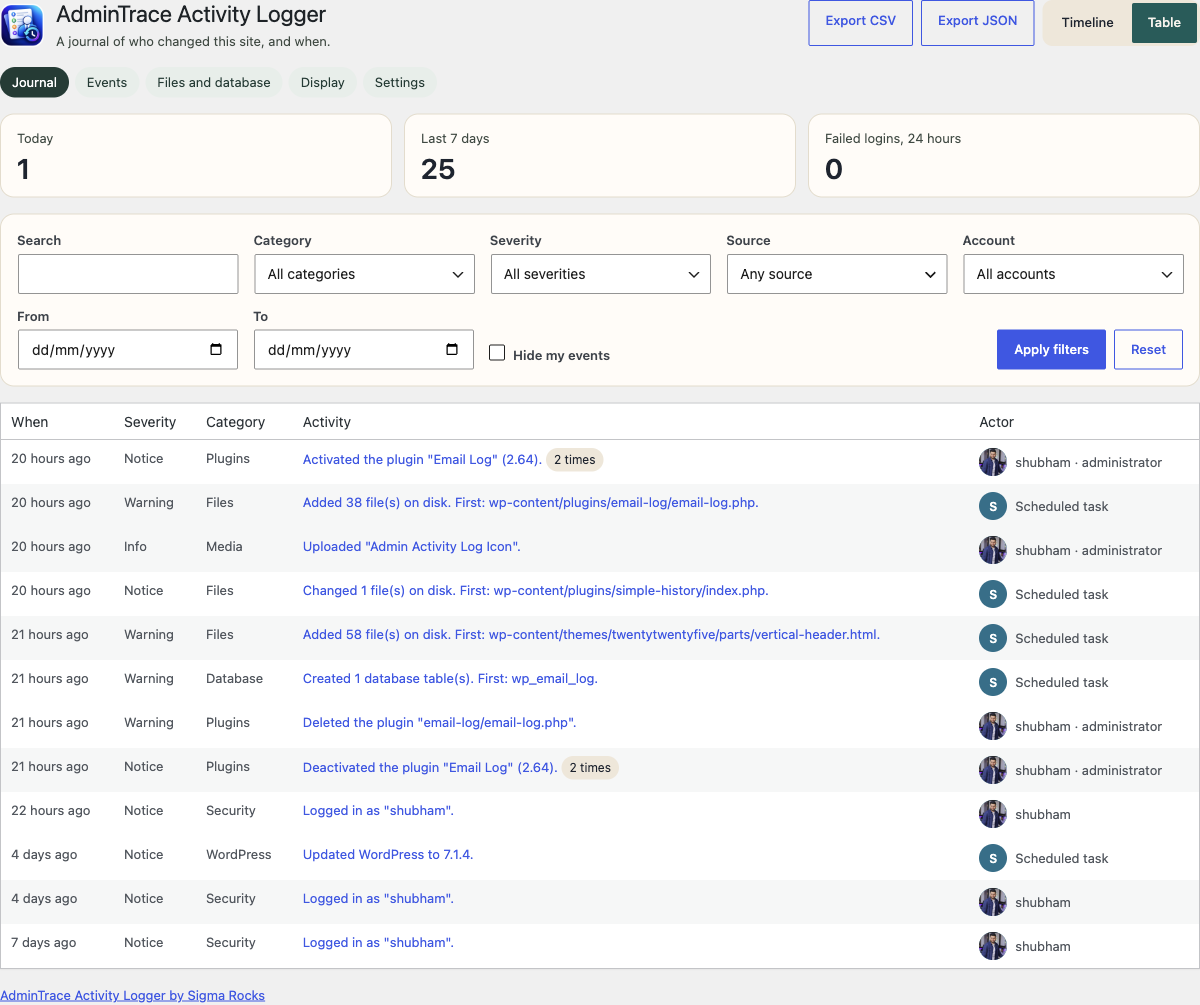
AdminTrace journal table view including the account and role for each change
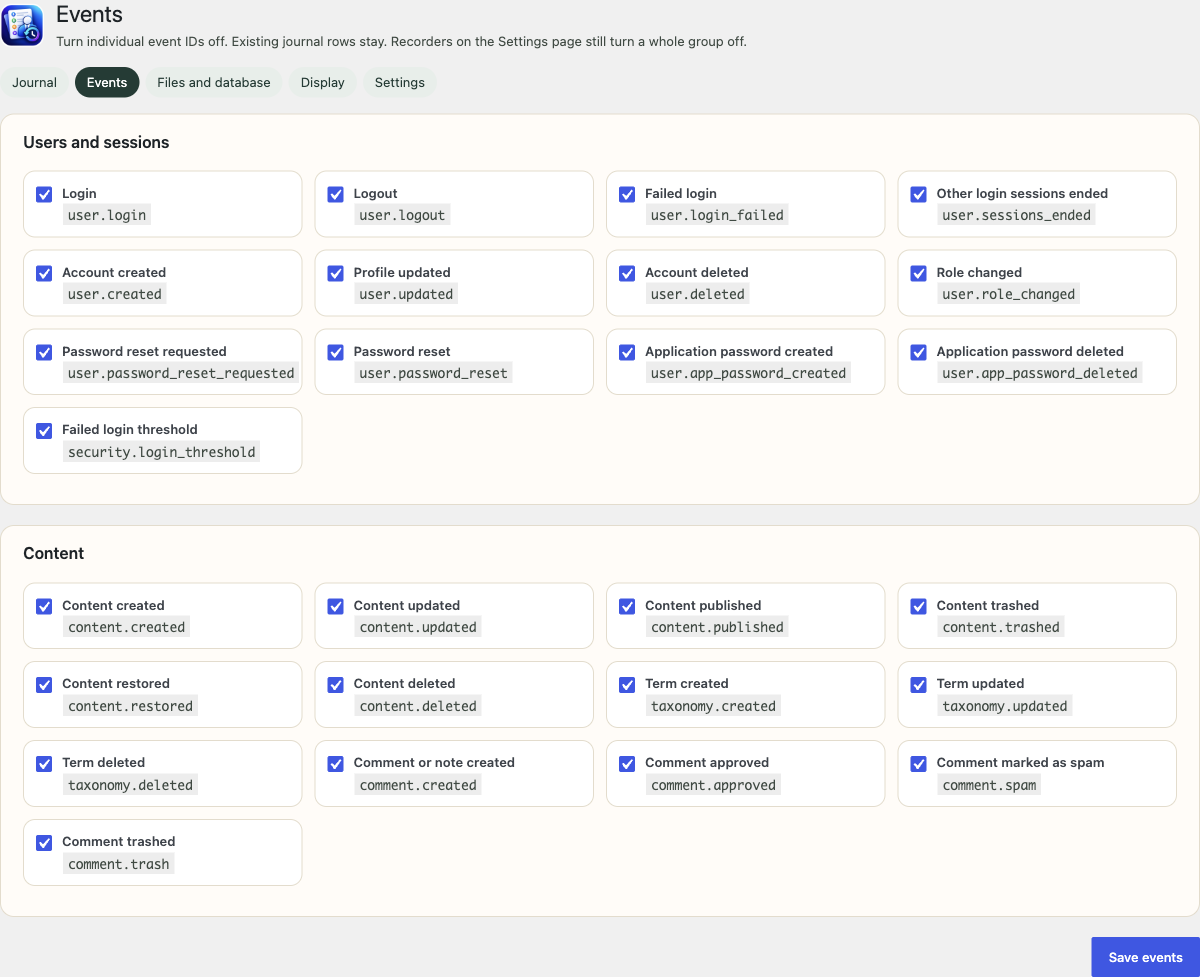
Individual AdminTrace event switches
File and database scan settings with recent added, changed, and deleted files
AdminTrace email log with search, result filters, and saved outgoing messages
Google reCAPTCHA v3 settings in AdminTrace
Works with

Recorded when the other plugin is active

WooCommerce

Orders, coupons, refunds, stock, price, SKU, and store settings.

Google reCAPTCHA v3

Optional invisible scoring on login, lost-password, and registration.

Two Factor

Accepted and rejected second-factor checks, with the method name.

Yoast SEO & Rank Math

On-page title, description, and social fields only.

Jetpack, ACF, Beaver Builder

Module toggles, field groups, and layout saves when those plugins fire their public hooks.

User Switching, Duplicate Post, Redirection

Account switches, clones, and redirect saves or deletions.

Install in three steps

Recording starts as soon as you activate it

  1. 1Upload the plugin folder to /wp-content/plugins/, or install the zip from Plugins → Add New.
  2. 2Activate AdminTrace Activity Logger.
  3. 3Open AdminTrace Activity Logger in the admin menu. Recording starts immediately.

Filter by category, severity, source, account, and date. Export the current view as CSV or JSON.

Network addresses are masked by default. The plugin does not look up a city, a host, or a map.

Privacy by default

The journal stays on this site. Profile marks are initials drawn by the plugin. Gravatar, the email digest, the HTTPS webhook, and reCAPTCHA stay off until you turn them on. Personal-data export and erase include rows tied to that account.

Alerts without noise

Two emails are on by default: failed logins that cross your threshold, and each critical event. Failed-login alerts mention when reCAPTCHA is still off. A daily or weekly digest is optional.

What it does not do

It does not hide itself from the Plugins screen, scan core against WordPress.org checksums, or forward events to syslog, Datadog, or Splunk. One HTTPS webhook is available. It does not record the body of outgoing HTTP requests.

Common questions

Frequently asked questions

Where is the journal stored?

In a database table named {prefix}srah_events on each site. Multisite installs keep a separate table per site. The journal stays on your WordPress site.

How long is activity kept?

90 days by default. Change the retention period in Settings, including 0 to keep events until you delete them, through 10 years. Administrators can delete selected events after a confirmation, or clear the journal for the current site.

Who can read the activity log?

Administrators can read everything. You can let editors and shop managers see content activity. They do not see security events or network addresses. Shop managers can also see WooCommerce events.

Does uninstall remove the data?

Yes, by default. There is a setting to keep the journal instead. Deactivation does not delete rows.

Does it send data anywhere?

The journal stays on this site. The email digest, webhook, private RSS feed, and Gravatar photos stay off until an administrator turns them on. Failed-login alerts and critical-event emails go to the site administration address, or to the alert address you set. Google reCAPTCHA v3 stays off until you add keys and enable it.

Does it include Google reCAPTCHA?

Yes, as an optional setting. Create reCAPTCHA v3 keys for your domain, paste the site key and secret key under AdminTrace Settings, and enable it. The challenge is invisible. When Google cannot be reached or the keys are invalid, login is not locked out. Blocked bot attempts are recorded in the journal.

Does it record WooCommerce orders?

Yes, when WooCommerce is active. Order status changes, coupon codes, refunds, stock changes, and product price or SKU edits are written to the same activity log. Customer email addresses are not stored.

Does it log outgoing email?

Only after an administrator opens Email log and turns it on. Saved emails go in a separate table from the activity journal. Preview the rendered message or HTML source, and resend to the same recipient. Attachments are not included when you resend. It is off by default because messages can include password-reset links.

Can I export the activity log?

Yes. CSV and JSON export follow the filters currently on the journal and stop at 5,000 rows. Cells that start with =, +, -, or @ are prefixed so a spreadsheet does not treat them as formulas.

Will the activity log slow down visitors?

Recording runs when someone changes the site, mostly in wp-admin. A logging failure is dropped instead of interrupting WordPress. The public site does not load the journal script.

Install AdminTrace on your WordPress site

Free on WordPress.org. Search for AdminTrace Activity Logger, or download the zip. If you find an issue or want another feature, open a support ticket.

Built by Sigma Rocks · Support forum